
Frontline employees are the face of your company, yet many organizations struggle to keep them as informed as their desk-based colleagues—not for lack of trying, but because traditional communication tools weren't built with deskless workers in mind. While desk workers check company updates between meetings, retail associates, warehouse teams, and field technicians often rely on secondhand conversations and group texts that quickly get buried—making it tough to stay in the loop.
A frontline intranet platform changes that equation by putting company news, schedules, and resources directly in employees' pockets. This guide walks you through the five best platforms for connecting deskless teams, the features that make the biggest difference, and how to choose the right fit for your workforce.
Key Takeaways
- Specialized Needs: Deskless workers (nurses, retail staff, warehouse teams) require mobile-first platforms because they often lack corporate email and fixed workstations.
- Top 2026 Platforms: Haystack, Simpplr, Staffbase, Blink, and MangoApps are the leading solutions for frontline engagement.
- Critical Features: Prioritize push notifications, simple, powerful search, and digital signage to ensure information reaches workers in real-time.
- ROI Impact: Effective communication reduces turnover, and replacing a single frontline employee can cost between $10,000 and $40,000.
- Implementation Strategy: Use a phased rollout or pilot program to gather feedback before a full organization-wide launch.
Why deskless teams need a dedicated intranet platform
For connecting deskless teams, the best frontline intranet platforms include Haystack, Simpplr, Staffbase, Blink, and MangoApps. Each platform offers mobile-first engagement, push notifications, and features designed specifically for employees who don't sit at desks. Traditional intranets built for office workers simply don't reach the people working on factory floors, in retail stores, at hospital bedsides, or on construction sites, highlighting why frontline worker communication requires specialized solutions.
Deskless workers, sometimes called frontline employees, are people whose jobs keep them moving rather than stationed at a computer. Nurses, warehouse associates, retail staff, and field technicians all fall into this category. Many of these employees lack company email addresses, rarely access desktop portals, and receive critical updates through word-of-mouth or group texts that get buried fast.
The communication barriers are real and specific:
- No dedicated workstation: Workers can't check desktop-based portals during shifts
- Limited or no corporate email: Many frontline employees aren't issued company email addresses
- Information overload from managers: Updates get lost in group texts or verbal handoffs
- Disconnection from company culture: Feeling invisible to headquarters breeds disengagement
A frontline intranet platform bridges these gaps by meeting employees where they already are, on their smartphones. When your warehouse team can pull up safety protocols, check schedules, and read company news from the same device they use to text their families, information actually reaches them.
Riviera Utilities faced this exact challenge when 75% of their workforce consisted of fieldworkers who needed instant access to information. Brittany Jackson, leading the initiative as a department of one, needed something "plug-and-play" that wouldn't require extensive IT resources. "I needed something that allowed me to easily pull all the data, resources, and files that every single department needed, put them in one place, and let it rock," she explained. After implementing their new intranet, the results were immediate—they achieved 100% adoption within a week of launch.
5 best intranet platforms for connecting frontline teams
The platforms below stand out for their mobile-first design, intuitive interfaces, and ability to reach employees wherever they work. Each takes a slightly different approach, so the right choice depends on your organization's specific communication challenges.
Haystack
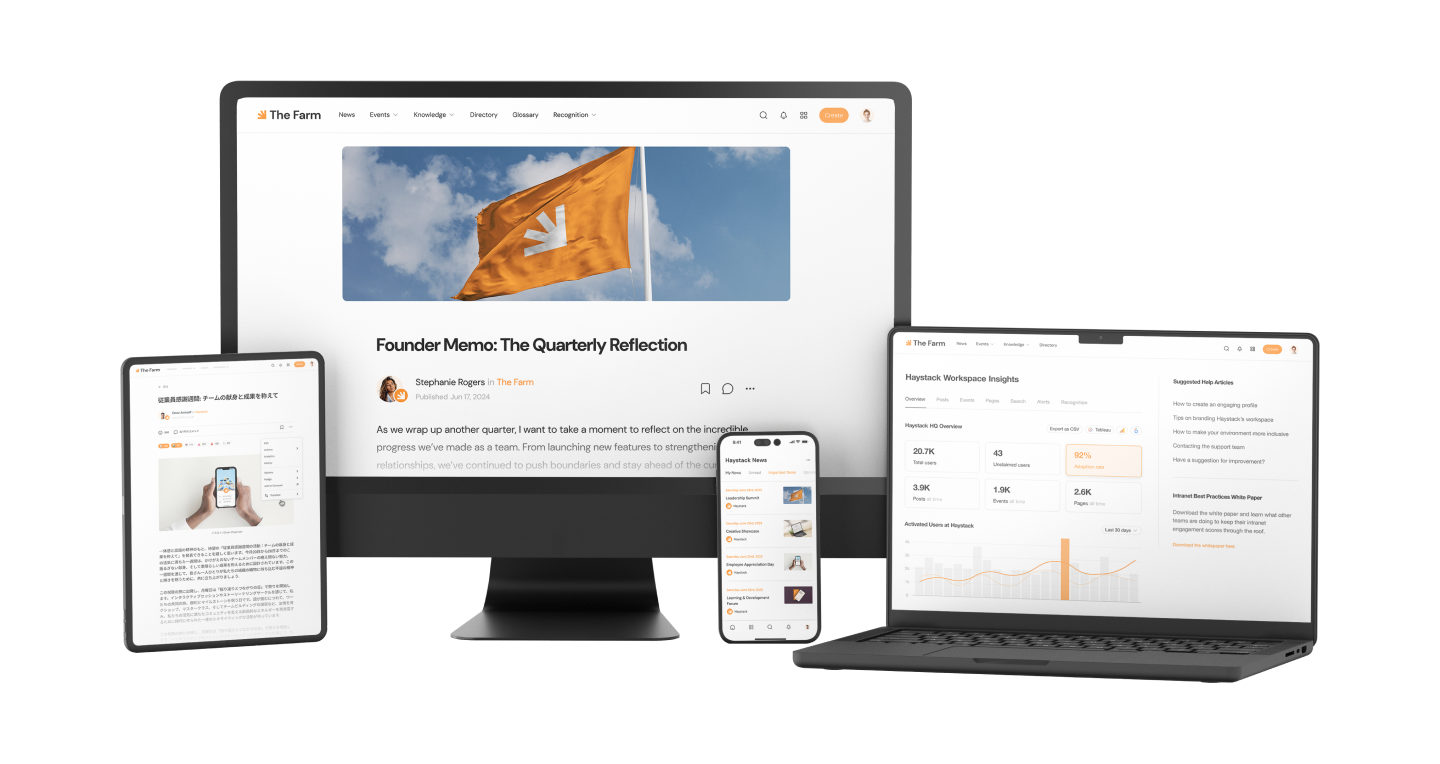
Haystack is an AI-powered intranet platform built to connect both office and deskless workers in one unified experience. The dedicated mobile apps work beautifully on iOS and Android, while digital signage extends reach to break rooms, factory floors, and retail back offices where employees gather.
Haystack's no-code customization means internal comms teams can update content, design pages, and highlight key resources without waiting on IT. The Secure Delivery feature ensures critical messages reach employees while keeping those communications internal, and Advanced Analytics show exactly who's engaging with your content.
InfluxData, a remote-first technology company, chose Haystack after struggling with an intranet where "editing was difficult" and support was nonexistent. Their team needed great search functionality, syncing compatibility with existing tools, and something clean and easy to use. "I was sold after the first demo," said Kristen Gibson from their People Ops team. The platform helped them establish greater stability during times of change while empowering managers to find policy information directly instead of constantly asking the people team over Slack.
HubEngage
HubEngage offers a modern intranet platform built to deliver a unified digital workplace for deskless and frontline employees. It combines internal communications, social engagement, and recognition into a single hub accessible across mobile, web, email, SMS, and digital signage. This multi-channel approach ensures that critical updates and resources reach employees wherever they are.
HubEngage’s gamification features like leaderboards, rewards, and participation-based points drive consistent usage, while AI-powered tools such as chatbots and automated surveys help streamline communication and surface insights. For organizations looking to deliver a more connected employee experience, HubEngage offers a flexible and scalable solution.
Simpplr
Simpplr positions itself as an AI-native employee experience platform with strong personalization features. The platform uses artificial intelligence to surface relevant content to each employee based on their role, location, and interests.
The clean interface makes navigation straightforward. Content targeting helps ensure frontline workers see information relevant to their specific site or department rather than getting buried in headquarters news.
Staffbase
Staffbase focuses on multi-channel employee communications, combining branded mobile apps with email newsletters and desktop access. The platform works well for organizations that want editorial-style content management with approval workflows.
For large, distributed workforces, Staffbase offers publishing features that let communications teams schedule and target content across different employee segments and locations.
Blink
Blink was built specifically for frontline and deskless workers from the ground up. The consumer-style mobile app feels familiar to anyone who uses social media, which helps drive adoption among employees who aren't particularly tech-savvy.
Features include chat, news feeds, and digital forms for tasks like incident reporting or time-off requests. Organizations wanting a straightforward, app-first approach often find Blink appealing.
Key features to look for in a frontline intranet
Now that you know the top platforms, here's what to look for when evaluating them. The capabilities below separate effective frontline solutions from desktop-focused intranets that leave deskless workers behind.
Mobile-first design and dedicated apps
The platform has to work beautifully on smartphones, not just be "mobile compatible." Dedicated iOS and Android apps load faster, support push notifications, and often work offline. A responsive website squeezed onto a phone screen doesn't cut it when someone has 30 seconds between tasks to check an update.
Intuitive interface for non-technical users
Frontline workers find information in seconds, not minutes, when the interface is simple. Consumer-grade UX matters more than feature depth. If the app feels as natural as checking Instagram, adoption follows.
At MyForest Foods, this principle drove their entire approach. They recognized that forcing employees into complex platforms creates resistance, so they focused on making their intranet fun and engaging instead. "The worst thing for engagement is to log in and have a platform that's just talking at you from the top-down, rather than something you're actively participating in," explained their team. By developing champions from various departments and keeping the interface simple, they created a hub where employees actually want to participate in conversations and engage with company-wide content.
Real-time push notifications and alerts
Urgent updates like schedule changes, safety alerts, and policy updates reach workers instantly through push notifications on their personal devices. Without push notifications, critical information waits until someone happens to open the app.
Centralized knowledge hub with AI-powered search
A knowledge hub is a single place for standard operating procedures (SOPs), training materials, FAQs, and company policies. Smart, universal search helps workers find answers by typing natural questions rather than knowing exact document titles or folder structures.
Digital signage and multi-channel delivery
Digital signage refers to screens in break rooms, warehouses, or retail back rooms displaying company news and updates. Multi-channel delivery means reaching workers via app, SMS, signage, or email depending on what access they have. Not everyone checks their phone during shifts, so meeting people through multiple touchpoints increases reach.
Two-way communication and employee feedback
Frontline workers benefit from being able to respond, ask questions, and share feedback rather than just receiving broadcasts. Surveys, comments, and quick polls build engagement and help leadership understand what's actually happening on the ground.
Integrations with existing workplace tools
Platforms work better when they connect with scheduling systems, HR software like Workday or BambooHR, and collaboration tools like Microsoft Teams or Slack. Integrations reduce the number of apps employees juggle and keep information flowing between systems.
Analytics to measure engagement and reach
Admins benefit from visibility into who's reading content, which locations are engaged, and where communication gaps exist. Without analytics, you're guessing whether your messages actually land.
How to choose the right intranet platform for your frontline workforce
Selecting the right platform starts with understanding your specific challenges. Here's how to approach the evaluation process.
Identify your biggest frontline communication gaps
Start by auditing where information breaks down today. Is it shift handoffs? Policy updates that never reach the floor? Safety alerts that arrive too late? Let your pain points guide which features matter most.
Prioritize mobile access and offline capability
If workers are in areas with poor connectivity like warehouses, hospitals, or remote job sites, offline access becomes essential. Some platforms cache critical content so employees can access schedules, SOPs, and contacts even without a reliable connection.
Evaluate customization and ease of administration
Consider whether your team can manage the platform without IT support. No-code customization empowers comms teams to update content and design pages without submitting developer tickets. This agility matters when you want to push urgent updates quickly.
Consider scalability and long-term fit
The platform you choose today will grow with your organization and shape your digital employee experience. Look for solutions that support new locations, multiple languages, and expanding employee populations without requiring a complete rebuild.
How much does a frontline intranet platform cost?
Pricing varies widely based on several factors, and most vendors don't publish rates publicly. The majority of platforms use per-user-per-month pricing, which means costs scale with your employee headcount.
Key factors that influence pricing:
- Number of users: Pricing typically scales with employee headcount
- Feature tiers: Basic plans cover core communication while advanced tiers add analytics, integrations, and AI features
- Implementation support: Onboarding, training, and migration services may be bundled or charged separately
- Contract length: Annual commitments often reduce per-user costs
To ensure the best investment, consider the following steps during the purchasing process:
- Request Custom Quotes: Pricing is rarely public; get tailored quotes based on your specific headcount and feature needs.
- Run a Pilot Program: Test the platform with a small subset of employees to measure engagement before a full rollout.
- Calculate ROI: Factor in retention savings. Replacing one frontline worker can cost between $10,000 and $40,000.
How long does a frontline intranet implementation take?
Implementation timelines depend on organization size, content migration complexity, and how many integrations you require. Simple deployments with minimal customization can launch in a few weeks. Enterprise rollouts with custom integrations, multiple languages, and extensive content migration typically take several months.
Many organizations find success with phased rollouts, starting with a pilot group at one location or department, gathering feedback, then expanding. This approach reduces risk and lets you refine your content strategy before going company-wide.
Build a connected deskless workforce with Haystack
Connecting frontline teams doesn't have to mean choosing between simplicity and power. Haystack brings communication, knowledge, and collaboration together in one platform that works for everyone, whether they're at a desk or on their feet all day.
With dedicated mobile apps, digital signage for common areas, and no-code customization that puts control in your hands, Haystack helps large organizations feel smaller and more connected. Frontline workers get the information they want, and your comms team gets the analytics to prove it's working.
Other common FAQs about frontline intranet platforms
What is the difference between a frontline intranet and a traditional intranet?
A frontline intranet is designed mobile-first for employees without regular computer access, while traditional intranets assume desktop access and company email. Frontline platforms prioritize push notifications, offline access, and simple interfaces that work for people checking updates between tasks rather than sitting at a desk.
Can frontline employees without company email still access an intranet platform?
Yes, most frontline intranet platforms support login via phone number, employee ID, or single sign-on (SSO). This flexibility ensures workers without corporate email addresses can still access company information, submit feedback, and stay connected with their teams.
How can organizations encourage intranet adoption among less tech-savvy workers?
Successful adoption starts with an intuitive, consumer-style app experience that feels familiar. In-person training during onboarding helps, as do manager champions who model using the platform. Most importantly, the content has to be immediately useful. Schedules, shift swaps, and relevant news drive daily engagement.
Are intranets still relevant today?
Yes. Modern intranets have moved beyond desktop portals. Today’'s platforms put news, schedules, and resources on any device, so every employee—desk or frontline—stays connected and informed.
What makes a good frontline intranet platform?
The best frontline intranets share five traits:
- Mobile-first design: Works great on any phone.
- Easy to use: Simple interface for quick, on-the-go tasks.
- Real-time alerts: Push notifications and offline access keep people updated.
- Smart search: Lets workers type natural questions and find answers fast.
- Integrations: Connects with scheduling, HR, and other workplace systems.
What security measures protect mobile intranet access on personal devices?
Frontline intranet platforms use enterprise-grade security including encryption, multi-factor authentication (MFA), and remote wipe capabilities. These measures protect company data even when employees access the platform from personal smartphones, which is common in frontline environments.
Do frontline intranet platforms work offline or with limited connectivity?
Many platforms offer offline modes that cache essential content like schedules, SOPs, and contact directories so workers can access critical information even without a reliable connection. Once connectivity returns, the app syncs any updates automatically.